

Follow'2'Print Your
flexible|vendor-independent|cross-vendor|patented
Pull-Print Solution
Our patented technology completely decouples the software solution from existing and future hardware. This provides maximum investment protection and flexibility in all areas of application.
With Mercury Follow'2'Print, print data is generated only at release – precisely adapted to the target device, regardless of manufacturer.
100% Made in Germany.

With Follow'2'Print, you decide where and when your print job is executed.
Driverless
The patented GPC technology requires neither printer drivers nor print queues.
Serverless
Print data is sent directly to the printer without a print server
Limitless
PC, Mac or mobile and all printer manufacturers in one solution
Why choose Follow'2'Print?
Benefits at a glance:

Maximum Security
Print jobs always remain secure within your network and can be released at any printer.

Cross-Vendor Compatibility
Works with all common printer models and MFP systems.

No Printer Drivers Required
Thanks to the patented Printer Client (GPC), time-consuming driver management is no longer necessary..

No Print Servers Required
The GPCs require no print server for either direct printing or Follow'2'Print.

Reduced Administration Effort
Up to 75% less IT effort through centralized, intelligent print management.

Seamless Integration
Integration with SAP, AirPrint, Entra-ID, OneDrive, host applications and more.
One Solution, All Possibilities
integrated
integrated
integrated
integrated
Mercury Follow'2'Print provides an innovative pull-print solution offering maximum flexibility and security for printing and scanning.
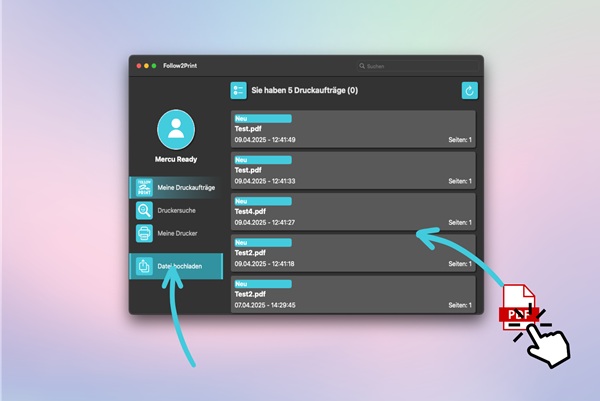
macOS
Follow'2'Print is also compatible with macOS.
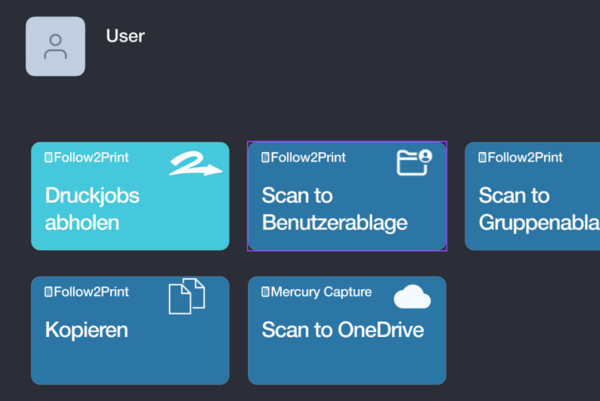
Scan to
Home folder, email, OneDrive and SharePoint are possible destinations for scanned documents

The smartphone app offers mobile printing, Share'2'Print, and can be used for authentication.
MFP Apps for All Major Manufacturers
Authentication is simple and convenient via username/password or PIN entry directly on the printer's touch panel. If a card reader is available, a smartcard or RFID access medium can alternatively be used. All common card systems are supported.
After authentication, the user receives an overview of all pending print jobs. These can be released directly or deleted if needed.

Security & Intelligent Features
for Modern Print Management
Printer Authentication
Authenticate via username & password, smartcard, QR code scan, or mobile app for maximum security.
Retrieve Jobs Flexibly Anytime
Print jobs are adapted just-in-time to the printer where they will be printed – cross-vendor and vendor-independent. Retrieval is also possible via the smartphone app.
Data Protection & Compliance
No uncontrolled printing of sensitive documents. The solution also ensures maximum data security, as all print data remains within the user's network.
Share'2'Print
Individual delegation of print jobs to colleagues directly from the workstation or worldwide via the mobile app.
Print Profiles & Permissions
Printers can be preconfigured with desired settings such as color printing, duplex printing, or printing on letterhead and automatically set up for individuals or workstations at login.
macOS and Mobile Print
Print with GPC for mac or send pdfs from your mobile phone to GPC Storage and pick them up at any Follow'2'Print device. Includes authentication, sharing of jobs, and targeted printer search. Your print jobs are available anytime.
AirPrint & Mail'2'Print Interface
Mercury OMS accepts print data via AirPrint from both iOS and Android devices and makes it available for pickup via Follow'2'Print.
SAP S/4HANA Integration
The certified SAP BC/XOM interface for SAP S/4HANA enables secure, end-to-end, bidirectional communication between the SAP application and printing, including pull printing.
PDF Generation & Workflows
Print data conversion to PDF, barcode application, form overlays, and OMR codes can also be performed by the Mercury software.
Four Flexible Operating Models

- Follow'2'Print mit Mercury OMS
- Direct print serverless
- GPC on premises
- Mercury OMS server
-
Druckertreiber

- Follow'2'Print Serverless
- Direct print serverless
- GPC with MCS cloud administration
-
Printserver -
Druckertreiber

- Follow'2'Print mit GPC Storage
- Follow'2'Print Serverless
- Direct print serverless
- GPC with MCS cloud administration
-
Printserver -
Druckertreiber

- Worldwide mobile print with GPC Storage
- Follow'2'Print serverless / with storage
- Direct print serverless
- GPC with MCS cloud administration
-
Printserver -
Druckertreiber
Terms & Conditions
- All licenses are per output device
- All licenses available in a convenient SaaS rental model
- Licenses for the on-premises variant also available as purchase version plus maintenance
- Development, hosting, and support by docuFORM staff in Germany
- Attractive reseller conditions upon request
Mercury Mobile Print - Print from Anywhere
With the Mercury Follow2Print mobile app, users can send print jobs from their smartphone or tablet and securely retrieve them at any printer. Available for iOS and Android.

Manage Print Jobs with Ease
Users can view their print jobs directly in the app, release them for printing, and share them with colleagues.
QR-Code-Scan
Simply scan the QR code of the desired printer and start the print job. This way, devices without a display can also be used for Follow'2'Print.
Mobile Print
Upload documents directly via the app and print at any compatible printer - ideal for flexible working and home office.
Download for free now.
The app is available for free download in the App Store and Google Play. A Follow'2'Print Mobile license is required for use. These are available for on-premises and serverless / hybrid variants.

Follow'2'Print App for Mac
Prepare print data from Mac for Follow'2'Print, search for printers, and share print jobs with colleagues via Share'2'Print.
The app is available for free download in the Mac App Store. A Follow'2'Print license and a GPC-Storage are required.
Mac App Store
Global Printer Client for macOS.
Finally native.
Mac and Windows. Two platforms. One system. No driver, no server – and your print data stays exactly where it belongs: with you.

-
🔒Your data stays with you Follow2Print jobs never leave the corporate network – even with cloud administration via Mercury Cloud Service.
-
🤝Mac meets Windows Share'2'Print works cross-platform. Mac users share jobs with Windows colleagues – and vice versa. Seamlessly.
-
⚡Setup in minutes Enter start code, printers are automatically detected and configured. No on-site admin effort, no driver rollout.
-
☁️Cloud administration · SaaS · Germany Affordable SaaS licenses, hosting in docuFORM data center Germany. Attractive dealer conditions.